Whisper Audio to Text Online: A Practical Browser Transcription Guide
Looking to transcribe audio to text free online with Whisper, or compare a browser-based Whisper alternative? This guide explains when Whisper-style transcription helps, what the first model download means, and how to export TXT, SRT, and VTT.
Whisper Online Transcription
Use Whisper-style transcription for editable drafts
Upload audio or video, load Whisper tiny models on demand, then copy text or export TXT, SRT, and VTT.
When Whisper audio to text is useful
People search for Whisper online audio to text, or transcribe audio to text free online with Whisper, when they need quick text from meetings, interviews, podcasts, lectures, or video dialogue. You may not need a managed transcription service right away. A clean editable draft is often enough to start taking notes, writing summaries, or preparing subtitles.
The Whisper audio to text page in Resodock uses a Whisper-style browser workflow. It works as a practical Whisper alternative: upload audio or video, choose the speech language, then copy the transcript or export TXT, SRT, and VTT.
Try it now
Run a short test in Whisper audio to text
Whisper transcription works best when you test a sample first. Upload 15 to 30 seconds, check the language and clarity, then process the full file.
- 1Open the Whisper audio to text page.
- 2Click the upload area or drag in an audio or video file.
- 3Choose the speech language. Use fast English for English recordings and multilingual recognition for other languages.
- 4Start transcription and wait while the browser loads the model and creates the text.
- 5Review the transcript, then copy text or download TXT, SRT, or VTT.
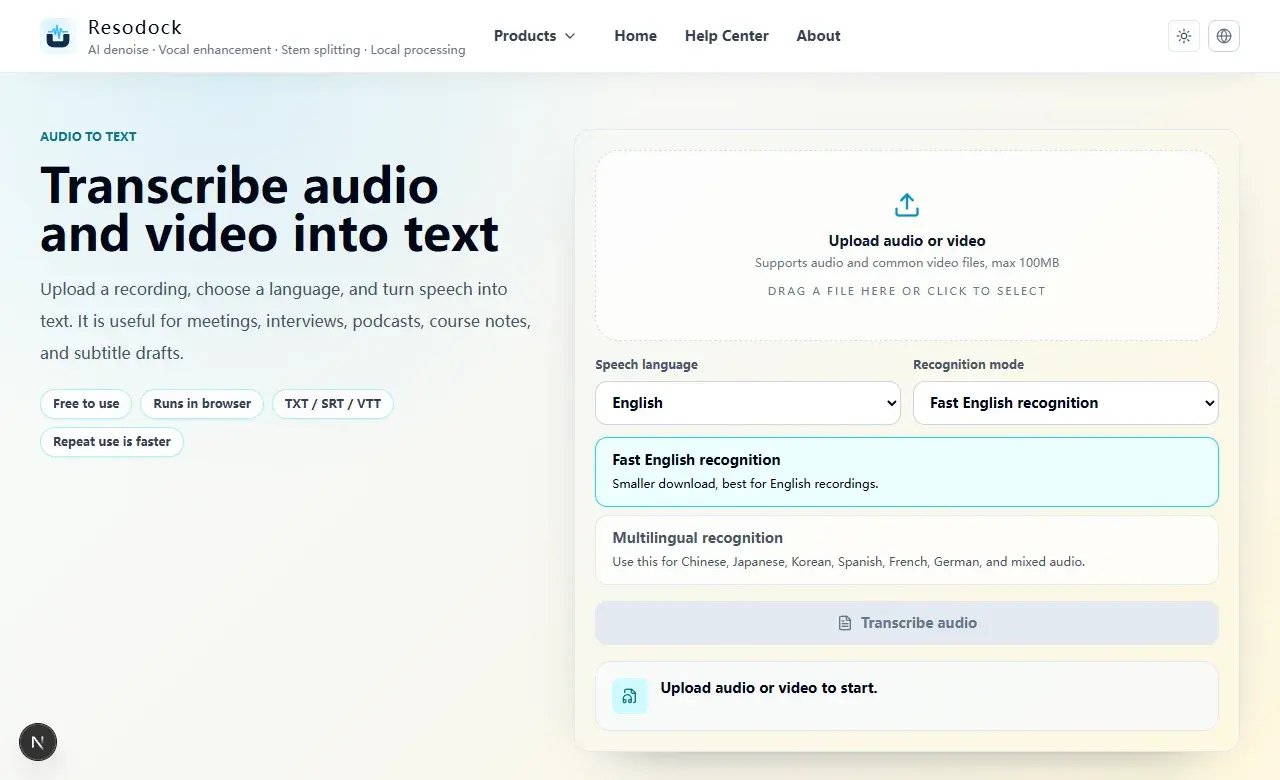
How to transcribe audio to text free online with Whisper
Start with a 15 to 30 second sample before you transcribe the full file. A short test shows whether the language choice, model loading time, and transcript quality are good enough for the recording.
Whisper-style transcription is useful for drafts, not for unchecked final text. Review decisions, names, dates, amounts, contract language, medical wording, and legal details before exporting or sharing.
What to expect from a Whisper alternative
A useful Whisper alternative should do more than mention the model name. Check whether you can choose the right language, export subtitle files, understand the first model download, and review the transcript easily.
Browser-based transcription keeps the workflow direct. The page loads recognition files only when you start. The first run can take longer because the browser needs model assets. Later runs on the same device usually reuse browser cache when possible.
How to use Whisper audio to text online
Open the Whisper online transcription tool, then upload MP3, WAV, M4A, FLAC, or a common video file. Use fast English recognition for English-only recordings. Use multilingual recognition for Chinese, Japanese, Korean, Spanish, French, German, or mixed-language audio.
Do not start with a full one-hour recording. Test 15 to 30 seconds first and check names, numbers, pauses, and technical words. If the draft is readable, process the full file and export the format you need.
Where Whisper transcription can be limited
Whisper-style transcription works best with clear speech. Distant microphones, loud background music, overlapping speakers, heavy echo, and strong room noise can create mistakes. Names, brands, acronyms, and amounts should always be reviewed.
If the recording is noisy, denoise or enhance a short sample first and compare the transcript. Automatic transcription is a draft tool. For legal, medical, contract, or financial content, do not rely on it without manual review.
Summary
Whisper online audio to text is best when you need a searchable, editable, exportable transcript draft. It reduces replay time and helps you prepare notes, articles, and subtitles.
Start with a short sample, choose the right language, wait for the model to load, check the transcript, then process the full file. Export TXT, SRT, or VTT based on what you need next.
Related Articles
Audio to Text
Audio to Text Online: A Simple Guide to Turning Recordings Into Text
Audio to text is not magic, but it is a fast way to turn recordings into editable drafts. Test a short clip, then export TXT, SRT, or VTT.
Audio to Text
How to Transcribe Audio Online for Meetings, Interviews, and Podcasts
Before you transcribe a full recording, test 30 seconds. Check language and clarity, then export text or subtitles.
Audio to Text
Audio Transcription AI for Meeting Notes: What It Can and Cannot Do
AI transcription is great for creating a meeting draft. You still need to verify decisions, tasks, names, numbers, and dates.
FAQ
Is this official Whisper?
It is a Whisper-style browser transcription page using Xenova Whisper tiny models. It is useful for testing audio to text online, but the transcript still needs review.
Why does Whisper transcription download a model first?
The browser needs speech recognition model files before it can process audio. The first run can take longer; later runs on the same device usually reuse cache when possible.
Can Whisper audio to text export subtitles?
Yes. You can download SRT or VTT as subtitle drafts, or export TXT for notes and cleanup.
Can Whisper online transcription handle Chinese audio?
Use multilingual recognition and test a 15 to 30 second sample first. Names, numbers, dates, and technical terms still need human review.